Monday, 21 October 2019

How to Create Automations on an iPhone or iPad

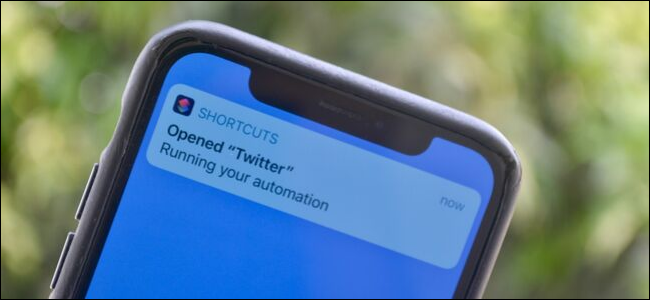
The "Running Your Automation" shortcuts notification on an iPhone.
Khamosh Pathak

Apple’s Shortcuts app has been integrated directly into iOS 13 and iPadOS 13. After years of consistent improvements, you can now create trigger-free, notification-based automations on your iPhone and iPad.

How Automations Work on iPhone and iPad

Apple introduced the Shortcuts app in iOS 12. Before that, the app was sold on the App Store as Workflow.

You can ask Siri to initiate a shortcut (a predefined set of actions) or press a button on your iPhone or iPad to do it. Now, a shortcut can fire off automatically based on given parameters. It can even happen in the background and use certain external triggers, like NFC. The Shortcuts Automations feature is available on devices that run iOS 13.1 or iPadOS 13.1 and above.

However, not all shortcut automations are automatic.

By default, the automation shows a notification in which you can trigger the shortcut after you tap “Run.” Some shortcuts based on direct physical manipulation with the iPhone or iPad do run automatically (more on this below).

RELATED: What Are iPhone Shortcuts and How Do I Use Them?

How to Create an Event Automation on iPhone or iPad

You can create two kinds of Automations on your iPhone or iPad: Personal and Home. Personal automations are related to your iOS and iPadOS device. The Home automations are related to your HomeKit devices.

In this article, we focus on the Personal automations on your iPhone and iPad. Let’s take a look at the actions you can trigger.

Events

  • Time of Day: You can trigger this at any time of day, at sunrise, or sunset.
  • Alarm: This shortcut runs when an alarm is stopped or snoozed.
  • Apple Watch Workouts: This can be triggered when a workout on your Apple Watch starts, pauses, or ends.

Travel

  • Arrive: A location-based trigger that activates when you arrive at a certain location.
  • Leave: A trigger for when you leave a certain location.
  • Before I Commute: This action tries to predict when you usually leave for work or home and triggers the shortcut at the given time, or up to an hour before you leave.
  • CarPlay: A shortcut is triggered when you connect or disconnect from CarPlay.

Settings

  • Airplane Mode, Wi-Fi, BluetoothDo Not DisturbLow Power Mode: This shortcut triggers when you turn these settings on or off.
  • NFC: With this trigger, you can tap your iPhone on an NFC sticker and run a shortcut. Modern iPhones (iPhone XS, XS Max, 11, 11 Pro, and 11 Pro Max) can run NFC shortcuts in the background.
  • Open App: This trigger runs a shortcut when you open any app.

Let’s walk through an example. Say you want to create a shortcut that plays soothing music when you open the Twitter app. Open the Shortcuts app, and then tap “Automation” in the bottom toolbar.

Read the remaining 66 paragraphs


Source: How-To Geek

5 Fun Halloween Treats Your Kids Can Make

a woman helps young kids make fun Halloween treats
Dragon Images/Shutterstock

If you’ve got little aspiring chefs in your home, we’ve got five fun Halloween treats for them to try. From festive Chex mix to Oreo lollipops, your kids will have a blast.

Halloween is an exciting holiday for many children and families all around. There are so many outdoor activities involved with this time of year, but sometimes the frigid, rainy weather keeps you indoors. If you find yourself in that dilemma, and you require an activity for your children, check out these neat recipe ideas.

Harvest Hash Chex Mix

Halloween Harvest Chex Mix, made with pretzels, chex, candy corn and Reese's.
One Little Project

If your family loves snacking on handfuls of Chex mix, then this recipe might be for you. It’s full of exciting ingredients and tastes super yummy. With pretzels, bugles, candy corn, and Reese’s pieces, each bite gives you a nice balance of sweet and salty.

If you have young kids, what’s awesome is this recipe has many steps they can do. You can have them pour in the separate ingredients or have them mix everything for the sauce. If you have older kids, they can melt the butter, do the measuring, and mix the entire combination of the Chex mix.

This recipe does involve an oven, so an adult will have to be present for that step. Once the Chex mixture has cooled, you’ll have a delicious snack for the kids to chow down on.

Get the Recipe: One Little Project

Ghostly Cheese and Crackers

Cheese and crackers made with cut out ghost cheese slices.
Peas and Crayons

If you need a no-oven snack that kids can make entirely on their own, this one is perfect. Festive Halloween cutters, sliced cheese, and crackers of your choice are all you’ll need. The author also gives an excellent recommendation to cut out apple slices, too.

Your kids will have to use the mini cookie cutters to cut out cheese and add them to the crackers. This is a great way to have your kids start “cooking” in the kitchen. The method is simple, but they can also learn about the cleanup aspect after their snack is complete.

Take this recipe to the next level by offering cold cut slices and other thinly sliced fruit to add to the arrangement of ghostly treats.

Read the remaining 15 paragraphs


Source: How-To Geek

How macOS Catalina’s New Security Features Work

Hands holding a lock over a MacBook
Issarawat Tattong/Shutterstock.com

macOS Catalina introduces new security controls. For example, apps are now required to ask your permission before accessing parts of the drive where documents and personal files are kept. Let’s take a look at what’s new for security in Catalina.

Some Apps Require Permission to Access Your Files

macOS Catalina Disk Access Permission Dialog

Apps now have to request permission to access certain parts of your file system. This includes your Documents and Desktop folders, your iCloud Drive, and any external volumes that are currently connected to your Mac (including flash drives, memory cards, and so on). This is the change that’s been getting the most headlines.

Apple has been pushing permission-based access for a while on iOS, and we’re seeing more of these security policies make their way into macOS. When you first upgrade to Catalina, this can result in a blizzard of permission request dialog boxes. This has led some to compare the feature to Windows Vista’s full-screen security prompts (but in reality, it’s nowhere near as egregious).

From a security standpoint, it’s a change to be welcomed, though it can take some time to get used to. Not every app will request access, either. In our tests, we were able to open and save files using markdown editor Typora, but navigating to the Documents folder in Terminal using the cd ~/Documents/ command prompted a request for permission.

Read the remaining 32 paragraphs


Source: How-To Geek

Boozing for Apples and 8 Other Adult Twists on Halloween Games

Apple bobbing station in a barn surrounded by apples, pumpkins, and a fake human skull.
Edward Fielding/Shutterstock

If you think you’ve aged out of party games, think again! We’ve revamped some Halloween tricks and treats for the 21 and older crowd. So, grab a costume, an adult beverage or two, and let’s have a grown-up good time!

You might have outgrown the standard balloon toss, and games like Spin the Bottle may have lost their thrill. Whether you’re looking for a game to break the ice, or one that’s more than fun with an icy beverage, we’ve got it!

We came up with nine spooky games to fill your FrightFest. All are best played in costume, and some might leave your guests genuinely terrified, but that’s okay. Because if there was ever a time to eat, drink, and be scary, it’s Halloween.

Boozing for Apples

Bobbing for apples is a classic harvest festival game. Of course, adults can play with the traditional fruit, but wouldn’t it be more fun to bob for something a bit less innocent?

There are two easy ways to turn this one into 21+ entertainment. You can buy a bunch of miniature liquor bottles (the kind you get on planes). Throw them into your tub or barrel with the apples and water. When a guest comes up with liquor instead of an apple, he has to take a shot.

Alternatively—and slightly more stealthy—is the shot-in-the-apple approach. For this, dig out a small hole in the top of the apples. Fill them with a shot of liquor, such as Fireball, and set aside. Give them a little time to absorb the liquor, and then float the spiked apples and let the games begin!

Don’t Say “Halloween”

Or “haunted,” or “scary,” or whatever you’d like the game to be. The idea is to create a “cursed phrase” that ties in with Halloween. This game lasts the entire party and—be warned—it can get intense. Be sure to let all guests know the phrase when they enter. A sign works well for this if you won’t be greeting everyone at the door.

Should anyone utter the cursed words, they have to take the anti-curse immediately! In this case, the anti-curse is, of course, an adult beverage.

For a twist, hand out inexpensive, colored beads at the beginning of the party. If someone hears another guest speak the curse, they can take that guest’s beads. The guest with the most collected necklaces at the end of the night wins the game.

Spooky Scavenger Hunt (with Pictures)

Read the remaining 18 paragraphs


Source: How-To Geek

Is macOS UNIX? (and What Does That Mean?)

A MacBook Pro with the lid partially open and the screen glowing onto the keyboard.
Razvan Franco Nitoi/Shutterstock

Is macOS UNIX or just Unix? Or is it Unix-like? We answer the never-ending debate and explain standards like POSIX and the SUS along the way.

macOS: UNIX or Not?

This subject raises a bunch of different questions. What is the lineage of macOS? How much of that hereditary material is still present in today’s macOS, and does it matter? Before we can begin to answer whether something is UNIX, Unix, or Unix-like, we need to be comfortable with what those terms mean. Who gets to decide if something is Unix or UNIX, and what criteria do they use?

Let’s start at the beginning.

Unix was created fifty years ago at Bell Labs, a research and development company owned by AT&T. Fast-forward to 1973 and Version 4 of Unix, which was rewritten in the C programming language. This made the operating system much more portable and easier to transfer to different hardware platforms. That same year, Ken Thompson and Dennis Ritchie, two of the core Unix architects, presented a paper at a conference about operating systems. Immediately they received requests for copies of the operating system.

Bound by a consent decree that dated back to 1956, AT&T had to eschew “any business other than the furnishing of common carrier communications services.” Unix didn’t qualify as something AT&T could profit from. So, the company did something remarkable for that time: distributed Unix as source code with a liberal license. Small charges covered the shipping and packaging and a “reasonable royalty.”

A Proliferation of Unixes

Because Unix was provided “as-is,” it came without support. As a result, a Unix community began to coalesce to help members, and patch and extend Unix. So, you could get the source code, modify it, and get support from the community. That’s got a familiar ring to it. Different flavors of Unix began to appear, adapted and tweaked to suit the organization doing the work.

Bob Fabry, a computer science professor at UC Berkeley, was on the program committee for the 1973 Symposium on Operating Systems Principles. He listened to a presentation by Thompson and Ritchie, entitled The UNIX Time-Sharing System.

Fabry requested a copy of the operating system, and, in 1974, Unix was installed on a PDP/11 at the Computer Sciences Research Group (CSRG) at UC Berkeley. Significantly, Ken Thompson spent a year there, working on what quickly became the university’s own flavor of Unix. Copies of the UC Berkeley changes and additions were distributed and became known as the Berkeley Software Distribution (BSD). Eventually, these became distributions of an entire Unix system, still known as BSD. Version numbers, such as 4.2BSD, identified the different releases.

In 1984, AT&T was released from the strictures of the 1956 consent decree and able to market its operating system properly. It included BSD code, such as TCP/IP, vi, and the C shell, csh. Even with this cross-pollination and collaboration, there were difficulties with licensing. BSD contained AT&T code, which was not open source, but the BSD elements were.

Read the remaining 25 paragraphs


Source: How-To Geek

Sunday, 20 October 2019

Geek Trivia: Which Computer Technology Derives Its Name From Greek Mythology?

Which Computer Technology Derives Its Name From Greek Mythology?

  1. Daemons
  2. NAND Gates
  3. Caches
  4. Processors

Think you know the answer?


Source: How-To Geek

10 Enticing Fall Cocktails for Your Next Get-Together

Friends gathered around a buffet full of food holding glasses of wine.
G-Rock Studio/Shutterstock

Throwing together a soiree for friends is fun, but it can also feel stressful without a bartender on hand. If you need to find the perfect fall cocktail for your next party, we’ve got some suggestions.

These 10 adult beverages are fantastic treats to share with your friends. With so many holidays around the corner, you’ll have many special occasions to enjoy sipping these fun refreshments.

Fall Sangria

A glass of sangria garnished with slices of lime and orange, and a cinnamon stick.
Everyday Maven

Whether you’re an oenophile or just enjoy the occasional glass with friends, this sangria is a great way to take wine to a whole new level. We understand some wine lovers wouldn’t dare mix other ingredients with their fermented grapes. However, some people can’t get enough of this sweet, refreshing beverage.

You don’t have to say goodbye to this summer BBQ classic just yet, because the autumn flavors in this version are out of this world. The tart apple, lemon, and lime flavors perfectly complement the cinnamon and cherry brandy. You’ll want more than one glass.

Get the Recipe: Everyday Maven

Spiced Apple Moscow Mule

Two Moscow Mules in copper mugs, garnished with granny smith apple slices and cinnamon sticks.
Home Cooking Memories

If you’ve never tried a Montana, Moscow, or Southern mule, there’s no better time than now. You can make this ginger cocktail in many ways, but the main ingredients consist of alcohol, ginger beer, and lime juice.

In this recipe, you learn how to make a spiced simple syrup out of sugar, water, cinnamon sticks, and cloves. The spices come alive and infuse perfectly into a fresh, aromatic drink you’ll enjoy.

Get the Recipe: Home Cooking Memories

Ginger Pear Snap Cocktail

A glass full of Ginger Pear Snap sitting next to a pear.
Boulder Locavore

This is one fancy cocktail—and a tasty one, too. Pear is in season this time of year and makes a great snack, so why not use it to create an adult beverage? The pear and ginger flavors, coupled with lemon and fresh rosemary, create a daring cocktail that is both fresh and delicious.

Read the remaining 25 paragraphs


Source: How-To Geek