Tuesday, 1 October 2019

Your Pandora Music Suggestions Are About to Get a Lot Better

Pandora Music app iOS
NurPhoto / Getty

In a world with Spotify, Apple Music, and other streaming services serve up an endless buffet of tunes, Pandora has needed to become more than just Internet radio. Today’s update brings new capabilities for personalization and content discovery.

Pandora’s mobile apps on iOS and Android are being revamped with a new “For You” tab that provides a continually updated feed of content that includes music and podcast recommendations. The items listed in this tab are tailored to you and selected by Pandora based on your listening history, what the software predicts about your mood, as well as factors such as what time of day it is, what day of the week and so on.

Another feature called “Modes” lets you customize how a station curates content, giving preference to the specific types of music that Pandora plays. For instance, you can have Pandora focus on playing music that is newly released, or hidden gems, or songs that are crowd favorites.

Between “For You,” “Modes,” and Pandora’s other recommendation modules, the service is equipped to deliver the ideal audio for any situation, whether it’s a rainy day or happy hour. The company said it will be rolling out more than 35 different modules over the coming months. Folks who listen to Pandora for free and don’t have a subscription can still access to the For You section without paying, but only for a single session after watching a video ad.

Pandora personalized menu
Pandora

“Our listeners have told us that they love the utility of Pandora — it’s drop-dead easy, it works, it knows me, It’s really simple,” said Pandora’s Chief Product Officer, Chris Phillips. “But what they haven’t been able to understand and have easy enough access to is all the content and programming that we have available on Pandora—the new content, new programming, and the unique content that you can’t get other places.”

The improved personalization options are rolling out in an update that should be available to all users within the next few weeks. In a separate reveal, Pandora has announced the availability of a Dark Mode feature for iPhone and iPad owners running iOS 13, as well as new voice commands courtesy of SiriKit for Audio. Apple users can simply tell Siri what they want to hear on Pandora and the app will take things from there.


Source: How-To Geek

GoPro’s Hero 8 Black Makes Mods Easy, Video Smooth, and Lenses Useless

GoPro has announced its Hero 8 Black action camera with a host of new improvements including next-level image stabilization, an integrated frame mounting system, and new accessories such as a directional mic for enhanced capture quality.

Starting from the outside, GoPro has gotten rid of the previous frame mounting system that was required to mount the camera, instead opting for built-in “folding fingers” on the bottom of the camera. The fingers can be collapsed into the camera when not being used, and when opened they provide a bracket that lets the device be attached to a mount. Now users won’t have to remember to grab the mounting accessory required by previous models, while the built-in fingers make it possible to access the battery and microSD card slot, which used to be blocked by the frame housing.

GoPro has also scrapped the removable lens cover—the Hero 8’s lens is made with Gorilla Glass that is twice as impact-resistant as the glass on past Hero models (2mm thick versus 1.3mm thick). Eliminating the removable lens cover has resulted in a slightly smaller footprint and the slimmer design makes the camera easier to fit in a pocket. This also means the camera loses the ability to ad filters to the lens, which is a huge bummer. If you’re worried about the durability, GoPro is selling a $20 kit that includes protective covers for both the lens and display.

The Hero 8 has even more improvements on the inside, not least of which being HyperSmooth 2.0, the latest version of GoPro’s electronic stabilization tech. Preliminary reports claim that the stabilization is so smooth that it can noticeably reduce the realism of your video. Fortunately, the feature can be enabled at varying levels, so you can let a little shake into the shot if it somehow improves the quality.

Folks who purchase the GoPro Hero 8 can also look forward to:

  • LiveBurst: Shoot three seconds of video—1.5 seconds before and after you hit the shutter–with 90 individual frames that you can check through to find single frames for photos. Similarly, raw photos can be captured in single images, bursts and time-lapses.
  • Time Warp 2.0: Adjust the capture speed settings from real-time to time-lapse. Now includes automatic speed selection instead of asking you what speed to capture at, as well as the ability to tap on the GoPro’s screen to speed it up or slow it down.
  • Improved SuperPhoto and HDR: SuperPhoto is essentially the GoPro’s intelligent auto mode and it can now take photos with greatly reduced motion blur. It also results in shots with better contrast and overall quality in varying light conditions.
  • Full HD livestreaming: Previously supported in 720p, the Hero 8 can livestream at 1080p.
  • New setting presets and digital lenses: Presets include Standard, Action, Cinematic, and Slo-Mo (as well as the ability to define your own), while the lenses include Narrow, Distortion-Free Linear, Wide, and SuperView. Narrow is described as your typical smartphone lens while SuperView stretches the shot from 4:3 to 16:9 through digital processing.

Other improvements include the ability to shoot video at up to 100 megabits per second, up from 78 megabits per second on the previous model; the ability to process night-lapse videos from within the camera; and a new horizon-leveling feature in the GoPro Quik app that lets you correct instances where you mistakenly shoot video that isn’t straight.

While the built-in mic is said to be improved when it comes to wind-noise reduction, GoPro will be offering an $80 Media Mod with a directional mic for noisy environments. The company has also announced a 200-lumen LED light Light Mod for $50, and an $80 Display Mod that provides a flip-up screen, each of which has its own power source so they don’t drain the main battery in your camera.

GoPro Hero 8 with accessories
GoPro

Read the remaining 4 paragraphs


Source: How-To Geek

How to Turn Your Mac On and Off

A dusty weary MacBook Pro highligting the power button
Khamosh Pathak

It might not be apparent how to power a Mac on or off if you’re a first-time user. Plus, what do you do if the machine is frozen? Here’s how to turn your Mac on and off no matter which model you own.

How to Turn On Your Mac

To turn on your Mac, all you have to do is press the “Power” button. The placement of the Power button depends on which computer you own. Steps for almost every Mac model can be found below.

If the machine is asleep, you can usually wake it up by pressing any key, lifting up the lid of the MacBook, or pressing the trackpad.

MacBooks with Touch ID Sensor

If you have a MacBook Pro (2016 or later) or a new MacBook Air (2018 and newer), you’ll notice there’s no physical Power button on your laptop. Instead, the power button is embedded in the Touch ID button, right next to the Touch Bar.

Power button on MacBook Pro with Touchbar model
Apple

Pressing on the button in the top-right corner will turn on your MacBook.

RELATED: Five Useful Things You Can Do With The MacBook Pro’s Touch Bar

MacBooks with Function Keys

If you have an older MacBook, MacBook Pro, or MacBook Air, you’ll see a physical row of function keys (F1 to F12) along the top of the keyboard. At the right end of the keyboard is the physical Power button. Holding down this button will turn on your MacBook.

Power button on MacBook Pro without touch bar
Apple

Alternatively, if you’re using the 2018 MacBook Pro or 2018 MacBook Air, pressing any key on the keyboard or clicking the trackpad will turn on the computer.

Mac mini

On the Mac mini, the Power button is a circular button at the back of the computer. It’s on the left side of the computer’s ports.

Power button on Mac mini
Apple

iMac and iMac Pro

Power button on iMac
Apple

Read the remaining 12 paragraphs


Source: How-To Geek

Do Toilet Seat Covers Actually Protect You from Germs?

airport bathroom with a paper toilet seat sanitary cover in place
aSuruwataRi/Shutterstock

When nature calls, you answer—but what if there’s no seat cover to protect you? The truth is, you don’t need to worry. That thin piece of paper doesn’t work, and the chances of contracting something harmful are non-existent.

No doubt about it: Public restrooms are ridden with bacteria of all kinds, which is why many people choose to use a toilet seat cover to prevent skin-to-seat contact; after all, dozens of strangers have used it before you, and that’s not a comfortable thought. However, to the dismay of germaphobes, using a sheet of paper as a protective layer against germs is essentially useless. Paper is a very porous material, and it allows the tiny little microbes to get through the holes and reach your skin.

While that might sound a little unsettling, experts say you have no need to worry. In fact, contrary to popular belief, toilet seats are not carriers of infectious diseases, so the chances of contracting a nasty bug are zero to none. Even if traces of disease-causing bacteria like E.coli rested on the surface, it’d be nearly impossible to catch them.

The only thing that could put you at risk of contracting an infection would be having an open wound on your buttocks that would allow the microbes to enter your system. In fact, our skin is the best protective barrier we have. Just as long as your skin is healthy and intact, you can rest assured that no harmful microorganisms will get you sick.

There’s no denying that entire colonies of bacteria inhabit the surface of any public toilet seat. However, if the thought of coming in direct contact with them gives you the chills, a reassuring (and perhaps equally terrifying) fact is that your phone is coated with ten times more bacteria than a toilet seat. If you’ve never fallen ill from taking a call on your cell phone, the chances of you getting an infection from using a public restroom are even smaller.

So while they might give us a sense of safety and comfort, toilet seat covers can’t really do much for us—they’re more of a decorative piece than a protective barrier against germs. Nevertheless, prevention should never be overlooked. Maintaining a healthy habit of washing your hands with soap after using the toilet and before every meal is a simple way to keep diseases away and give you peace of mind.


Source: How-To Geek

Make That Thief Think Twice: Our Favorite Bike Locks

Bike locks on the ground next to a bike wheel.
Olexander Kozak/Shutterstock

If you use your bicycle as a primary mode of transportation, a reliable lock is essential! A good bike is expensive; if you want yours to stay where you leave it, the models on this list will lock it up.

What Makes a Good Bicycle Lock?

You have to trust the lock you buy to keep your bicycle safe from theft. Before you choose one, you should think about what you’re looking for in a lock:

  • Type: There are two main types of bike locks. Pin and tumbler are the most common, as they’re cheap to make. However, they’re also easy to pick with a paper clip, bobby pin, or lockpick. Disc-retainer locks, however, are much harder to crack. A thief needs professional tools and a lot of practice to get those open.
  • Durability: The most common way thieves remove bike locks is by sheer force. Picking a lock takes a ton of time and an incredible amount of practice. So, most thieves try to cut off a lock with bolt cutters or power tools, or they leverage it against something and try to snap it off. This is why locks need to be made of strong materials with reinforced connection points.
  • Weight: One of the biggest drawbacks of a strong, secure bike lock is they are usually large and heavy—the two tend to go hand in hand. Unfortunately, when you commute by bike, a heavy lock can slow you down.
  • Ease of Use: If you regularly commute by bike, you’ll use your lock all the time. So, you want one that’s easy to use, and not complicated, confusing, or a chore to open.

It’s important to note that any lock can be picked or broken given enough time, determination, and, of course, power tools. This doesn’t mean you shouldn’t get one, though—any security measure is better than just leaving your bike on the street unattended.

A lock is intended to be a deterrent. If someone attempts to break off a U-Lock, it’s going to take a while, and it would also be incredibly obvious to passersby. A good lock will make a thief think twice about whether the risk is worth it.

However, even the best lock can only protect your bike if it’s used properly—follow these steps to get the most security out of your lock. If you’d like more info about any of the locks on our list, including their strengths and flaws, the YouTube channel LockPickingLawyer has videos about most of them.

Best for Most People: Kryptonite Evolution New U-Lock

The Kryptonite Evolution 11-14mm U-Lock with FlexFrame-U Bracket.
Kryptonite

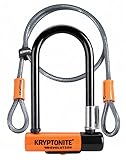
The Kryptonite New-U Evolution gives you some peace of mind while your bike rests safely, locked by the curb. This three-pound Kryptonite lock uses a disc-retainer core that makes the picking process difficult. The 13mm hardened steel U-bolt also makes it very hard to cut or break apart. Both ends of the shackle lock into place, and they cannot rotate without being unlocked. This means a thief has to cut the lock in two places to remove it, which doubles the amount of time it would take to do so.

The Best for Most People

Kryptonite Evolution Mini-7 13mm U-Lock Bicycle Lock with FlexFrame-U Bracket & KryptoFlex 410 10mm Looped Bike Security Cable

The Kryptonite New-U Evolution Lock has a 13mm hardened steel shackle that locks on both sides, and a secure disc-retainer core that will keep your bike safe on the streets.

Premium Pick: Kryptonite New York Lock Fahgettaboutit

The Kryptonite New York Lock Fahgettaboutit Mini 18mm U-Lock Bicycle Lock.
Kryptonite

Kryptonite is famous for its high-security locks, and the Fahgettaboutit New York is one of the strongest on the market. This 4.5-pound lock has all the benefits and features of the Kryptonite Evolution, except it’s thicker, stronger, and more resistant to brute-force attacks.

Read the remaining 14 paragraphs


Source: How-To Geek

The New Logitech G Pro X Mechanical Keyboard Makes Switch Swapping Simple

Logitech G Pro X Keyboard
Logitech

Worried that you won’t like the switches on your new mechanical keyboard? Or maybe you just want to customize the switches on certain keys? Logitech’s new G Pro X makes those problems easy to solve.

Beyond simply allowing you to remove and replace the keycaps that sit on top of keyboard, the G Pro X ships with a puller device that lets you detach the switches underneath the keys. Most mechanical keyboards have their switches soldered on, so the process is considerably more involved to swap their key switches, requiring each one to be desoldered before soldering on a new one. A handful of boutique models make it easier than that to swap switches, but this is a first from mainstream manufacturers such as Logitech.

We haven’t tested the G Pro X yet, but if we may speculate a bit about its performance, an immediate trade-off to a swappable switch design could be switches that aren’t quite as stable to the touch as those that are soldered to the board. But Tom’s Hardware has gotten hands-on with the board and says its switches “seem to stay solidly in place” after being popped off and put back on. The G Pro X is further described as having a “plasticky” feel despite being solidly built, and it’s noted that the switches and sockets are tested for upwards of 1,000 plugs and unplugs to ensure durability.

Along with the swappable switches, Logitech’s G Pro X features a tenkeyless design with 92 keys (no number pad), a detachable Micro USB cable, and RGB lighting that can be customized through Logitech’s G Hub software.

Logitech will be selling packs of 92 switches for $49.99 and they’ll be available in GX Blue Clicky, GX Brown Tactile, and GX Red Linear variants. These GX switches aren’t made by Cherry but Logitech reportedly told Tom’s Hardware that Cherry MX switches are also compatible with the board. It will likewise work with standard Cherry MX keycaps, which are widely available with custom designs.

Pricing for the G Pro X is set at $149.99 and pre-orders are open now. In the event that you find the board attractive but don’t necessarily care about the swappable switches, a non-X “G Pro” is also on offer for the lesser price of $129.99.


Source: How-To Geek

How to Make Chrome Your Default Browser

Google Chrome logo

With a market share of 64 percent on mobile devices and 67 percent for desktop/laptop so far in 2019, Google Chrome is the most installed web browser used today. Here’s how you can make Chrome your device’s default browser.

In this guide, we will show you how to set Chrome as the default web browser on Windows, macOS, Android, and iOS.

Note: To set Chrome as your default browser, you must download and install it first. Windows and macOS can download it from Google’s website while iOS and Android use its respected app stores.

Make Google Chrome the Default Browser on Windows

Open up System settings by pressing Windows key+I, and then click on “Apps.”

Open the Settings app and click on "Apps."

From the pane on the left side, click “Default Apps.”

Click "Default Apps."

Locate the Web Browser section, click on your current default browser, and then scroll through the list and select “Google Chrome.”

Read the remaining 36 paragraphs


Source: How-To Geek